
Order Types Glossary
The orders Indian brokers offer, how each one fills, and how the choice shows up as slippage in your results.
About order types terms
Order types decide the price you get and how an exit behaves when the market moves fast. A market order fills at once at whatever price is available. A limit order fills only at your price or better. Stop and stop-limit orders wait for a trigger price. Indian brokers add their own variants: GTT orders that stay active across sessions until triggered or cancelled, bracket and cover orders with a stop attached at some brokers, and auto square-off of intraday positions near the close.
The order type explains a lot of the gap between planned R and actual R. A stop-loss market order in a thin option strike can fill well below the trigger, and a stop-limit order can jump past its limit and not fill at all. Record the order type with each trade, then compare slippage by order type and by time of day. If market orders at the open cost more than the setup earns, the fix is in how you enter rather than in the setup itself.
Key terms in this category
Start with these, then use the full list below.
- In-depthSlippageSlippage is the difference between the price you expected and the price you were actually filled at.Slippage = (Fill price − Expected price) × Quantity for buys; (Expected price − Fill price) × Quantity for sells
- In-depthMarket OrderA market order buys or sells straight away at the best prices available in the order book, so you are certain to trade but not certain of…Slippage = (Average fill price − Expected price) × Quantity for a buy; (Expected price − Average fill price) × Quantity for a sell
- In-depthLimit OrderA limit order is an order to buy or sell at a price you set or better: a buy limit fills at or below your price, a sell limit at or above…
- In-depthStop Limit OrderA stop-limit order has two prices: a trigger that activates it and a limit that is the worst price you will accept once it is live.Sell SL: Trigger ≥ Limit. Buy SL: Trigger ≤ Limit. Worst filled loss on a long = (Entry − Limit) × Quantity
- In-depthGTT OrderA GTT (good till triggered) order is a standing instruction held by your broker that places a limit order on the exchange only when the…
- In-depthBracket OrderA bracket order places an entry together with a target and a stop-loss in one go; when either exit fills, the other is cancelled.Breakeven win rate = Risk ÷ (Risk + Reward)
All 17 order types terms
- Good Till Date (GTD)A good-till-date (GTD) order stays in the market until it fills, you cancel it, or a date you choose passes.
- GTT OrderA GTT (good till triggered) order is a standing instruction held by your broker that places a limit order on the exchange only when the price reaches a trigger you set.
- Iceberg OrderAn iceberg order splits one large order into smaller visible pieces, so the order book shows only a slice of the full quantity at a time.
- Immediate or Cancel (IOC)Immediate-or-cancel (IOC) is an order validity that fills whatever quantity it can the moment it reaches the exchange and cancels the rest at once.
- Market on Close (MOC) OrderA market-on-close (MOC) order is an instruction to buy or sell at the official closing price of the session, whatever that price turns out to be.
- Market OrderA market order buys or sells straight away at the best prices available in the order book, so you are certain to trade but not certain of the price.
- SlippageSlippage is the difference between the price you expected and the price you were actually filled at.
- Square OffSquaring off means closing an open position with an equal and opposite trade, so your net quantity in that contract goes back to zero.
- Stop Limit OrderA stop-limit order has two prices: a trigger that activates it and a limit that is the worst price you will accept once it is live.
- Stop OrderA stop order stays dormant until the price reaches a trigger level you set, then becomes a live order to buy or sell.
Checking fills trade by trade
Each trade shows its open and close price and time, commissions and fees, and net against gross P&L, with entry and exit marked on a 5-minute chart.
See journaling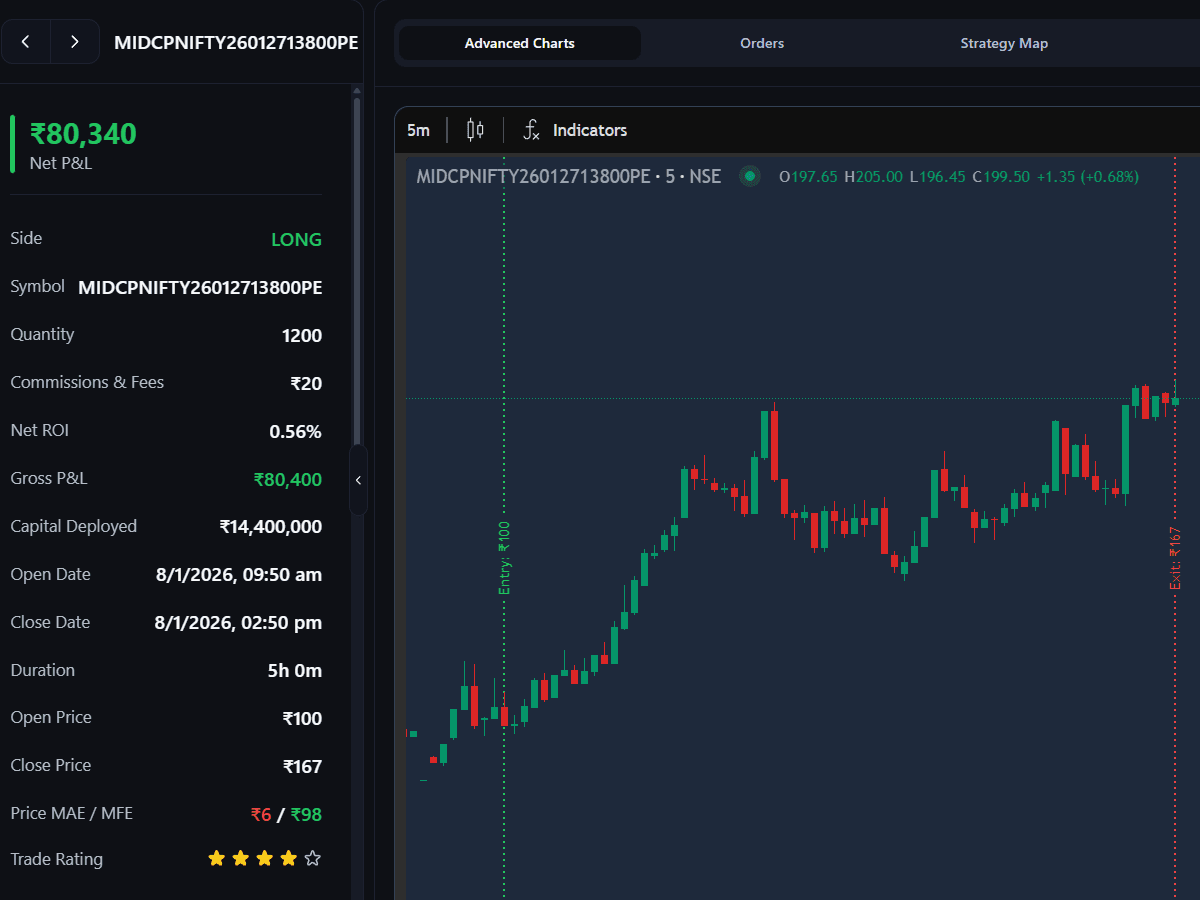
Guides and tools for order types
- GuideHow to keep a trading journal for NSE F&OWhat an options and futures trading journal in India should record: contract, lots, MIS or NRML, planned risk and net P&L after STT, plus expiry-day tags.
- GuideHow to analyze P&L by period, time of day and symbolCompare trading P&L across fair, equal periods, find the sessions and weekdays that cost you money, and spot when one NSE symbol is carrying your whole month.
- GuideWhat is TradeLyser? Trading journal for IndiaTradeLyser is a trading journal for NSE and BSE traders. See how broker sync works, what each main part of the app does and how to set it up in your first week.
- Free toolBrokerage calculatorBrokerage, STT and exchange charges on a trade.
Other categories
All 370 terms, A to Z →Track it on your own trades
Connect your Indian broker and review every trade with tags, notes and per-strategy numbers.