
Your broker app tells you what you made today. It cannot tell you whether this month was better than last month for the right reasons, which hours of the session cost you money, or whether one stock carried your whole book.
This page covers three cuts of the same P&L: by period, by time of day and weekday, and by symbol. Each one answers a different question, and together they usually point to one specific change for next week.
Compare equal windows, after charges
Start from net P&L, after brokerage, STT, exchange charges and GST. Gross numbers flatter scalpers who trade often, and net is what reaches your bank account. Count closed trades only, unless you deliberately track open F&O positions as a separate line.
Then compare like with like. If you took 12 trades this week and 40 last week, the rupee totals are not comparable. Use expectancy (average net P&L per trade) or average R per trade when trade counts differ.
| Comparison | Use it for | Skip it when |
|---|---|---|
| Week vs previous week | Behaviour fixes, rule-break checks | Fewer than 15 trades in a week |
| Month vs trailing 3-month average | Strategy expectancy, symbol cuts | Tags or rules changed mid-month |
| Quarter vs quarter | Retiring a playbook, moving capital | Position size changed and was not logged |
| Before vs after a rule change | Testing one discipline change | Several changes in the same fortnight |
Mark the events you cannot ignore before you compare: Union Budget week, RBI policy days, election results and the monthly F&O expiry. A strategy that looks broken across all of March may be fine once the budget week is set aside. A note in the journal header for those days keeps later filters honest.
Slice by time of day and weekday
Many intraday strategies make their money in one part of the session and give some of it back in another. The illustrative book below is up ₹23k for the period, but the two midday windows together lost ₹13k.
A trader with this profile has a simple test to run: stop taking new trades between 11:00 and 14:30 for a month and compare. The opening half hour and the last hour stay as they are.
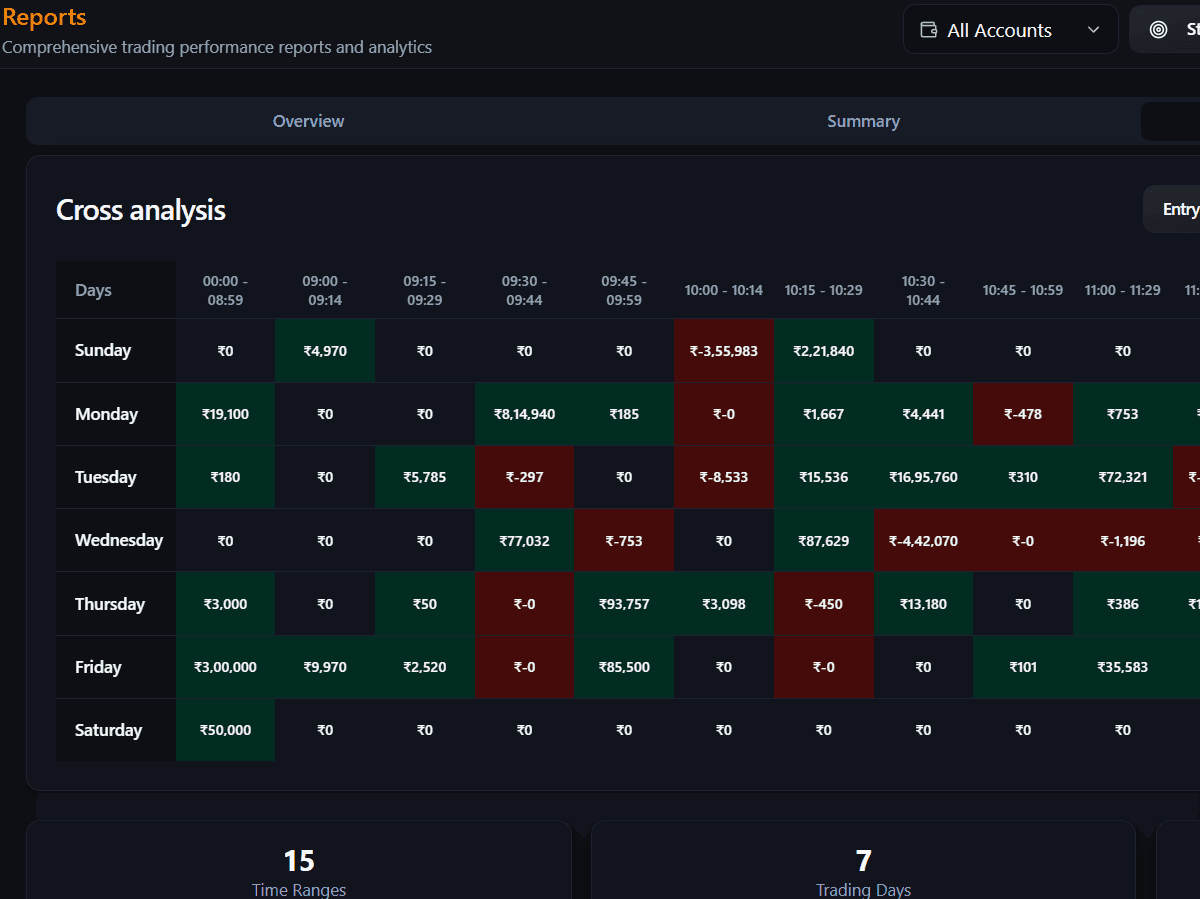
The weekday axis matters for index traders. Nifty weekly options expire on Tuesday, so Tuesday rows often look different from the rest of the week. Reports › Summary also lists your best and least performing weekday with net P&L and win % by day, which is a quick first check before the full grid.
Symbol analysis: where the edge lives
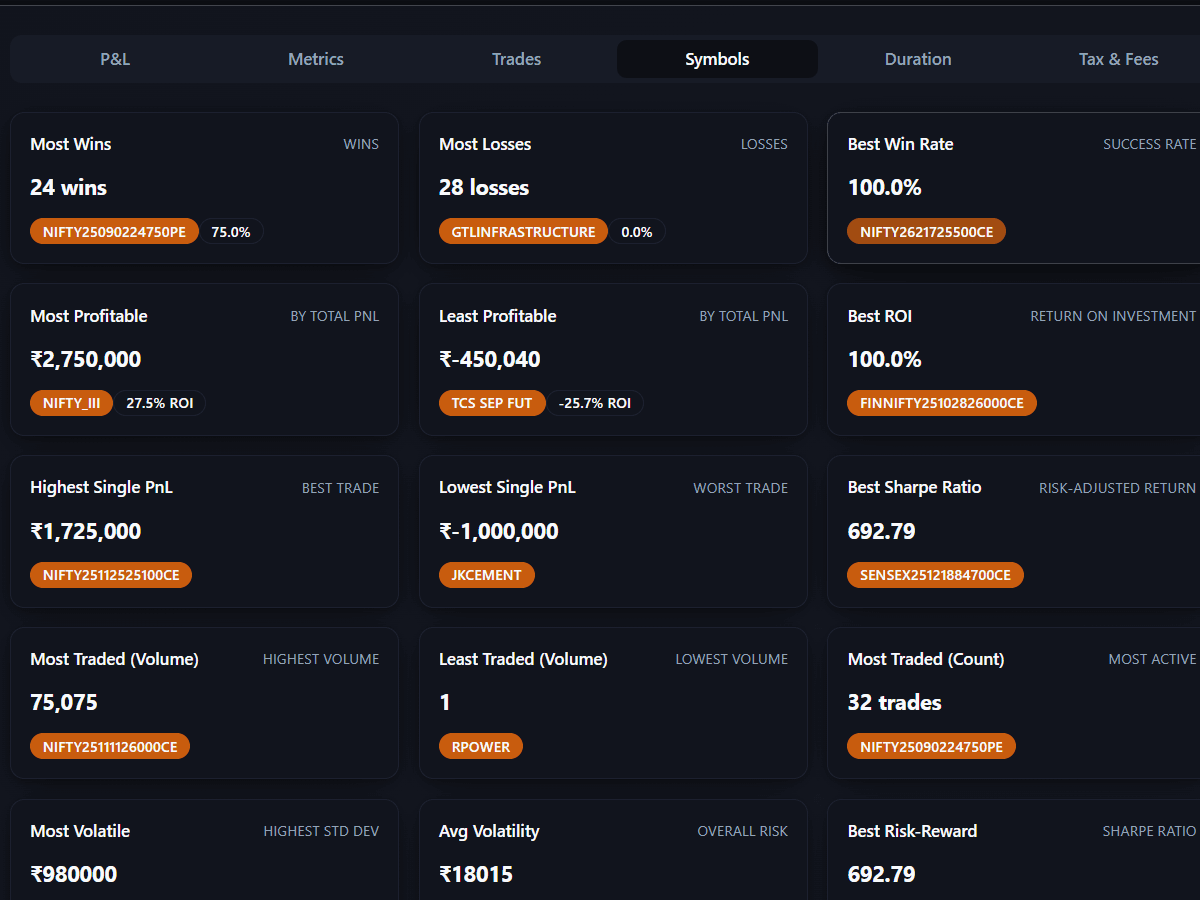
Symbol reports answer which instruments deserve your capital and screen time. A cash swing trader may find that three large caps produce most of the net P&L while ten small-cap experiments eat brokerage. An index trader may find Nifty spreads steady while FinNifty buys drain the month. Use these three flags as rules of thumb.
Concentration
Thin sample
Persistent loser
Group symbols into the buckets you actually trade, such as Nifty 50 names, private banks, IT or your own mid-cap list. A mean-reversion setup can work in defensive stocks and bleed in high-beta ones, and a single-symbol table hides that. Use the same symbol lists every month so the buckets stay comparable.
Worked example: two weeks, two strategies
An illustrative case. A trader runs an opening range breakout on Nifty and a range fade on Bank Nifty options. Week 2: the Nifty tag made +₹18,400 net on 22 trades, an expectancy of +₹836 and profit factor 1.9. Week 3: the same tag lost ₹4,200 on 19 trades, an expectancy of −₹221 and profit factor 0.8. The Bank Nifty tag made ₹6,100 in both weeks.
The account was still green in week 3 because Bank Nifty covered the gap. Filtering by symbol and day showed the Nifty losses bunched on expiry Tuesday, at 1.5 times normal size after a winning morning. The fix was a single line in the plan: half size on expiry day for the Nifty tag. The strategy itself stayed, because its eight-week expectancy was still positive.
A Friday routine
- Check that every fill synced and every closed trade has a strategy tag.
- Set equal date ranges for this period and the one you compare against.
- Read account net P&L and drawdown, then filter by each live strategy tag.
- Open Cross analysis and note any time slot or weekday that is red across several weeks.
- Open Symbols and list the top five by net P&L and any symbol that trips a flag.
- Write one action in your journal, such as dropping a symbol or skipping a time window.
Common traps
- Using your best month ever as the baseline instead of a trailing average.
- Comparing gross P&L. On options, STT is now 0.15% of sell-side premium, and it adds up on small trades.
- Renaming tags mid-period, then wondering why strategy numbers jumped.
- Dropping a symbol after five trades because of one gap.
- Treating the broker app daily P&L as strategy analysis, when it blends every tag and symbol.
Questions traders ask
How long should my comparison period be?
Match it to how often you trade. Day traders can compare four-week windows, while swing traders usually need three months to collect enough closed trades for the numbers to settle.
Should I stop trading a stock after one bad week?
Usually not. Look for negative expectancy that holds over 30 or more trades in that symbol, and check whether the bad week was driven by an event such as a results day or an expiry.
Why is my account P&L positive when one strategy is losing?
Another strategy or symbol is covering the losses. Filter your report by strategy tag and by symbol, and the losing slice usually shows up within a few minutes.