
TradeLyser shows a few AI and analytics scores: the Lyser Score on the dashboard, day ratings from LYSA, the discipline score from your rules, and a health score if you connect Whoop. Each one compresses a lot of trades into one number, which makes it quick to read and easy to misread.
This page explains what each score summarises, what it cannot see, and a short routine for checking a score against your actual trades before you change anything. The scores help you decide where to look in a review. The decision still comes from the trades.
The scores you will see in TradeLyser
Lyser Score
LYSA day rating
Discipline score
LYSA Health Score
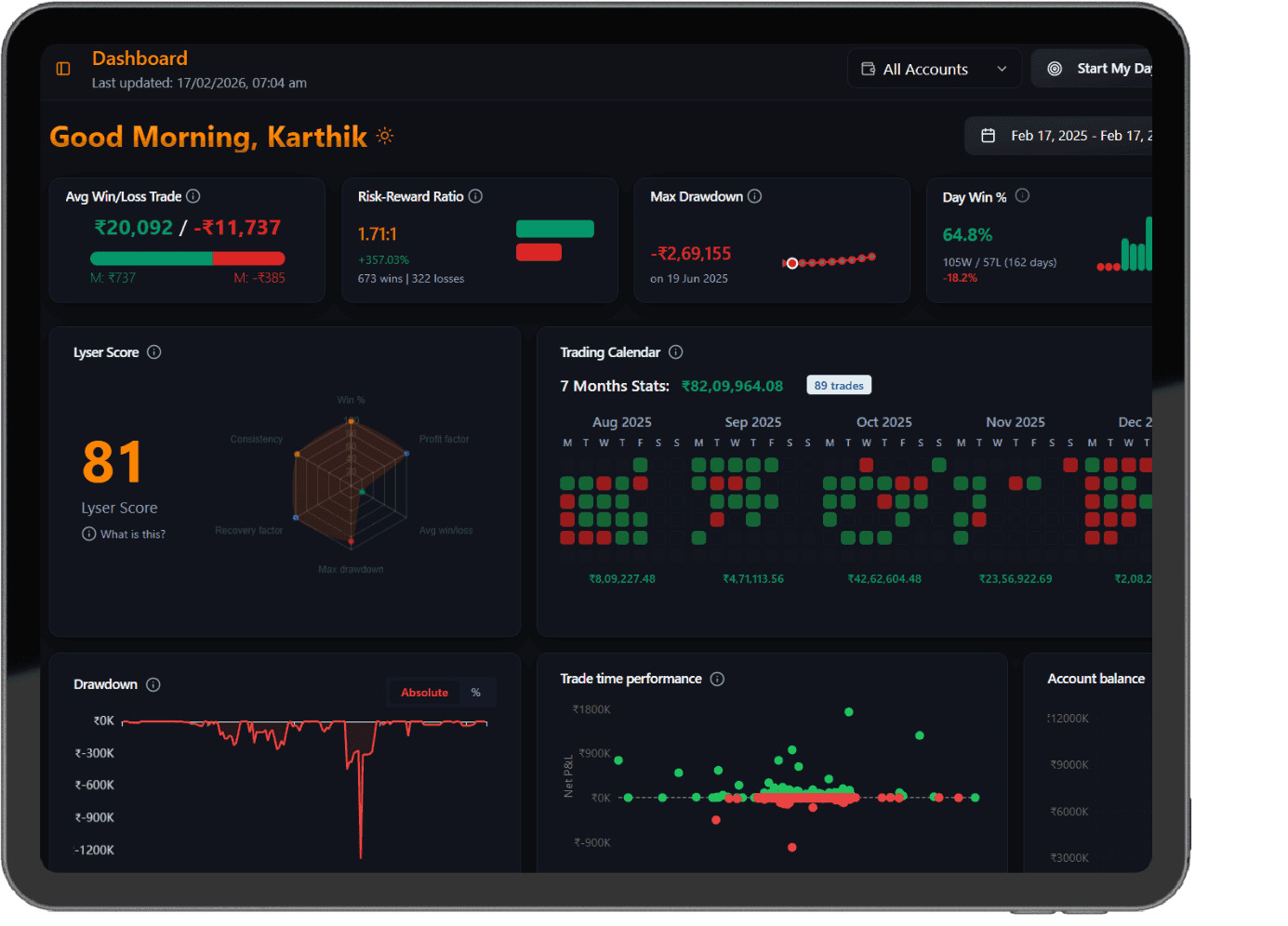
The radar is the useful part. Two traders can both sit at 70 for different reasons: one with a healthy win rate and a deep drawdown, the other with shallow drawdowns and a poor average win to average loss. The number tells you something changed. The radar tells you which area to open.
What a score can and cannot tell you
Every score is built from what is in your journal: synced trades, charges, tags, rule ticks and notes. It cannot see trades from an account you did not connect, a tip you acted on and never noted, or a stop you moved without tagging the trade. Missing data does not show up as a warning. It shows up as a score that looks precise and is wrong.
Small samples are the other limit. A score built on twelve trades can swing hard on one result. As a rule of thumb, wait for 30 or more trades in a period before reading a trend in any score, and treat day ratings as a prompt to compare two specific days rather than a verdict on your trading.
Check a score against your trades
Run the same check every time a score moves enough to catch your eye. It takes about ten minutes and stops you from reacting to a data error or a single trade.
- Confirm the data. Trade count and net P&L for the period should match your broker's contract notes, with no missing sessions.
- Find the area that moved. On the Lyser Score radar, see which axis changed; for a day rating, read the key insights LYSA listed.
- Open the trades behind it. Sort the period by P&L and read the largest winners and losers.
- Remove the biggest single trade and recompute the period's net P&L. If the picture flips, one trade is driving the score.
- Write one line in the journal: what the score said, what the trades showed, and whether you will change anything.
In this illustrative week, a trader held two lots of Bank Nifty futures (60 units at a lot size of 30; check the current NSE circular, as lot sizes are revised) through a 350-point move for +₹21,000. Any score that rewards profit factor or average win will look better this week. Take that one trade out and the remaining 19 trades lost ₹2,600. The score rose; the everyday process did not improve.
Reading LYSA day ratings
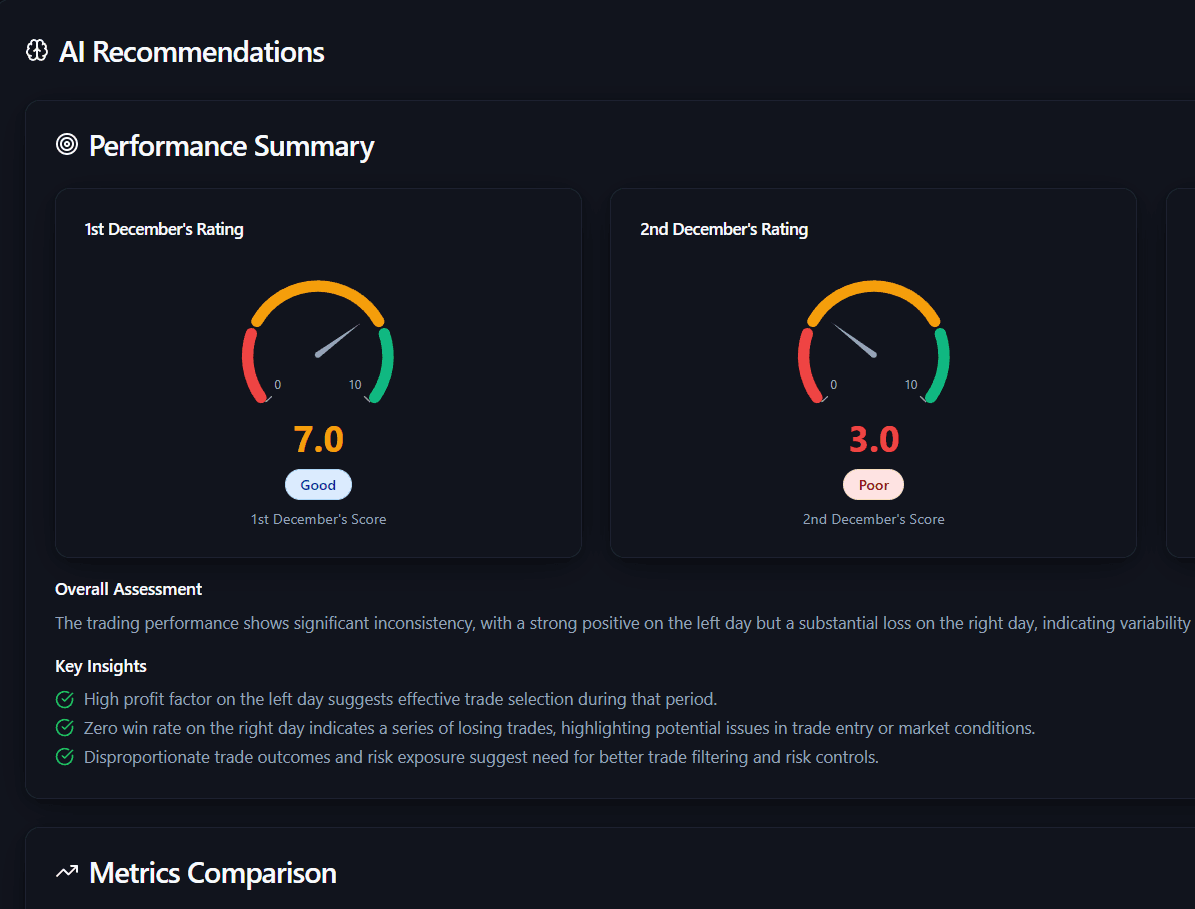
A 7.0 next to a 3.0 says the second day went worse. It does not say why. Open both days in the journal and ask one question: did the rules break, or did the market simply not offer your setup? A 3.0 day where every trade followed the plan is a normal losing day. A 3.0 day with three revenge entries after 2 pm is a rule problem.
| What moved | Check first | Likely next step |
|---|---|---|
| Score up sharply | Is one trade carrying the period? | Keep size unchanged until the next review. |
| Score down after a quiet week | Missing syncs or untagged trades | Fix the data, then reread the score. |
| Drawdown area worse | Largest losses and their stops | Check the stop rule on those trades. |
| Low day rating | Rule ticks on that day's trades | Separate rule breaks from normal losses. |
Common mistakes with AI scores
- Adding a lot because the Lyser Score went up after one large winner.
- Reading scores before the week's trades have synced.
- Comparing your score with another trader's. Different books, sizes and instruments make the numbers incomparable.
- Treating a low day rating as proof the strategy is broken, without opening the trades.
- Checking scores during market hours and changing the plan mid-session.
- Ignoring the radar and reacting only to the headline number.
Questions traders ask
What is the Lyser Score in TradeLyser?
It is a single number on the TradeLyser dashboard that summarises consistency, drawdown and recovery in your own trade history. The card also shows a radar of win %, profit factor, average win/loss, max drawdown, recovery factor and consistency, so you can see which area is pulling it down.
Can AI trading scores predict the market?
No. They are built from trades you have already taken and the tags and notes you logged. They describe how you have been trading, which is useful for review, but they carry no information about where Nifty or any stock goes next.
Why did my AI trading score suddenly drop?
Check the data first: a missed sync, duplicate trades or untagged trades can move a score on their own. If the data is clean, open the trades from the period and look for a large loss, a cluster of rule breaks or a jump in trade count.