
A mentor who can see your actual trades spots things you miss: the third entry after two stops, the lot size that grows after a green morning, the stop that keeps moving on expiry day. Mentor Hub in TradeLyser gives a mentor that view of a student's journal, with comments attached to the trades themselves.
This page covers how mentor mode works, what to share, what a mentor should look at, and a 30-minute session format. It is written for both sides, because a review only helps when the student arrives prepared and the mentor sticks to process.
How mentor mode works in TradeLyser
A mentor invites students from Mentor Hub and sees their performance in one dashboard, with mentees grouped by batch. From there the mentor can open a student's own dashboard in a read-only "Viewing as" mode and browse trades, entries, exits, screenshots and notes.
Feedback is attached to the work. A mentor can comment on a specific trade, position or note, and tag a trade with a mistake such as a revenge re-entry. The student sees every comment on a Mentor Comments page under Reports, each with an "Open in context" link back to the trade or note. Coaching notes are kept in Notebook Folders.
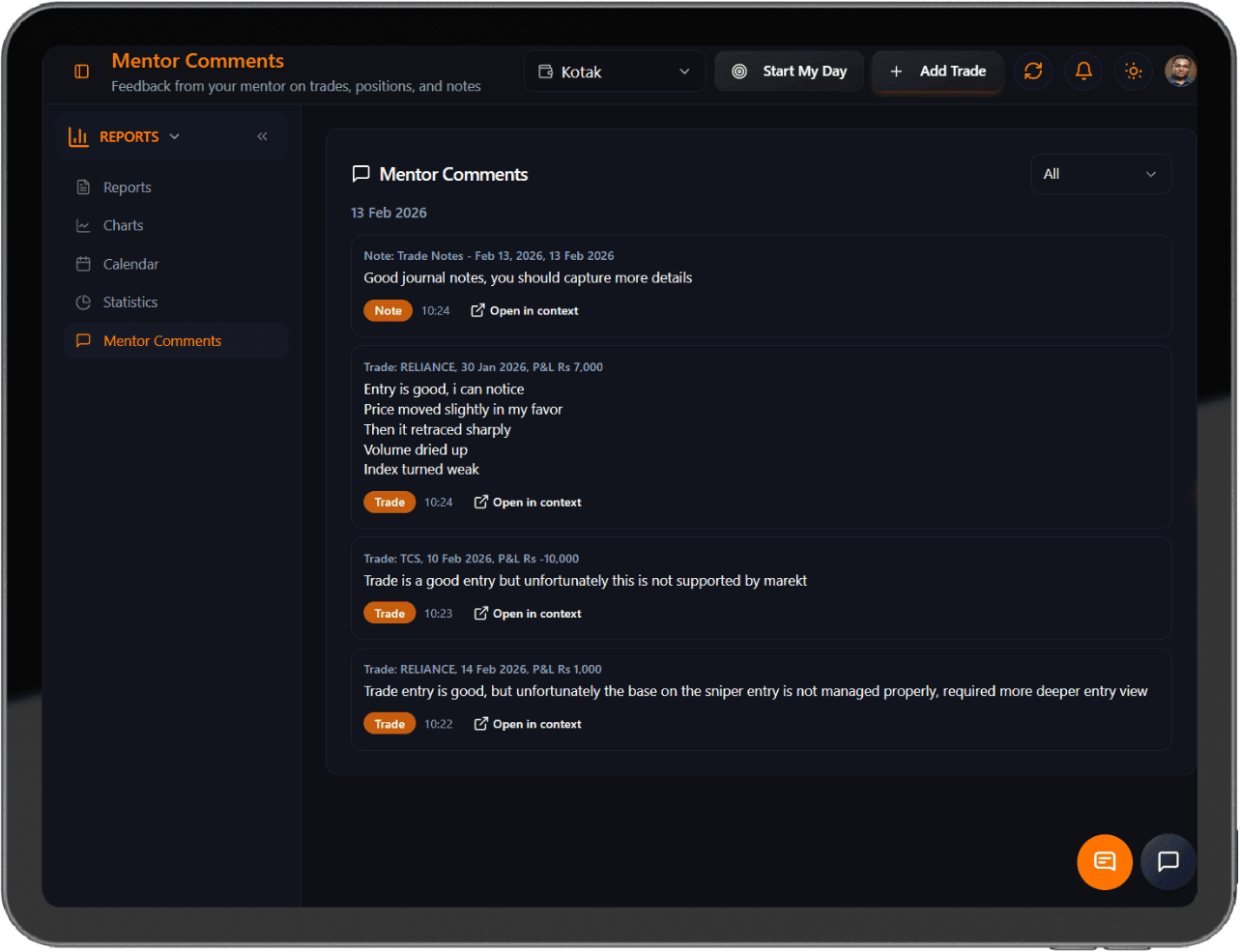
The student controls the scope. You can grant full access or limit it to specific accounts, and you can connect with more than one mentor. Mentor Hub also includes a leaderboard that ranks mentees by net P&L. Treat it as an activity view. The student with the best month may also have the most rule breaks.
Set up sharing on purpose
- Decide which accounts to share. If you keep a long-term investment account or a test account, limit access to the trading account being coached.
- Write down the boundaries before the first session: process review is in, buy or sell calls are out.
- Sync the last month and tag every trade with a strategy, so the first session is not spent fixing data.
- Agree a cadence, such as 30 minutes every second Friday, and a fixed format.
- Review what is shared whenever the arrangement changes, and again when it ends.
What a mentor should review
- Tag coverage. Untagged trades often hide the impulsive ones.
- Daily loss limit. Did the student stop at the rupee limit they wrote down?
- Expectancy and drawdown per strategy, not just the account total.
- Discipline score over the fortnight, and which rule fails most.
- Notes on the worst day: short, specific and written the same evening.
- Whether the student ran their own weekly review before the session.
Illustrative: a student's rule is a ₹5,000 daily loss limit. On Tuesday they were at −₹5,200 by 11:40, then took two more Nifty option trades of 2 lots each (130 units at a lot size of 65; check the current NSE circular). The first lost 15 points (−₹1,950) and the second 10 points (−₹1,300). The day closed at −₹8,450. The useful comment is about the two trades taken after the limit was hit.
If the student uses LYSA, ask to see what they did with its recommendations: which they accepted, rejected or deferred, and why. A student who accepts every card without opening the trades needs a different conversation from one who rejects them all. Treat AI summaries as a starting point for questions, and check any claim in the trades together before agreeing a change.
A 30-minute session
The student opens with three lines sent before the call: one thing that went to plan, one miss, one question. The mentor then spends ten minutes on the numbers: adherence, expectancy per strategy and drawdown against limits. Seven minutes go to the worst day, with one question: was it a rule break or a market that did not suit the setup? The student writes one change in their own words, and the last two minutes confirm the next date and that the shared access is still right.
| Weak comment | Useful comment |
|---|---|
| "Bank Nifty looks strong for tomorrow." | "Your Bank Nifty losses this fortnight all came after 2 pm. What changes in your plan after lunch?" |
| "Stop being emotional." | "Two entries came within ten minutes of a stop-out. Your rule says 30 minutes." |
| "Your win rate is too low." | "Win rate is 44%, but average loss is larger than average win on Tuesdays only. Look at expiry-day stops." |
| "You exited too early." | "Your plan says hold to the target on A-setups. Three A-setups closed early. What made you exit?" |
Red flags on both sides
- A mentor asking for your broker password or login. A journal review never needs it.
- Sessions about which strike or stock to buy tomorrow.
- Promises of a fixed monthly return.
- A student who leaves bad days untagged before the session.
- Several changes agreed in one session, with none checked at the next.
- Feedback given only in chat apps, away from the trades it refers to.
Questions traders ask
What can a trading mentor see in my journal?
In TradeLyser Mentor Hub you choose what to share: full access, or only specific accounts. Within what you share, a mentor can browse your trades, entries, exits, screenshots and notes, and leave comments on them.
How often should a trading mentor review my journal?
As a rule of thumb, a 30-minute session every two weeks works better than daily check-ins. Two weeks gives enough trades to see a pattern, and the gap makes you run your own review instead of waiting for the mentor.
Should a trading mentor give me buy or sell calls?
Not in a journal review. A mentor's job here is to look at how you followed your plan, sized trades and handled losses. Paid stock or F&O recommendations are a different activity that SEBI regulates separately.